Kick Streaming Growth Guide 2026: 41+ Proven Tips for New Streamers
Kick in 2026 is wide open—but growth won’t come from luck.
This playbook of 40+ tips gives you a step-by-step system for turning scrollers into regulars: hooks, scenes, schedules,
Shorts funnels, collabs, and the metrics that actually move the needle.
And yes, Viewbotter now supports the Kick platform (no downloads) - with tools that help you grow the right way.
- Kick view bot: with human-like bots, ability to control the flow, no mass drops, geo-based follower targeting and most importantly end-to-end encryption for safety.
- Kick chat bot: context-aware messaging, advanced behavioral randomization, burst reactions, human-like timing and tone, and much more.
- Kick follow bot: each follower is cloaked with randomized browser and device fingerprints, system that checks dropped or ghosted followers and replenishes them with new fresh ones, GEO-based follower targeting, and many more features.
Use code VIEWBOT20 for 20% off and build real discovery, real engagement, real retention.
Choose a Memorable, Emotion-Triggering Name to Grow on Kick
Your name is your billboard in the carousel. Pick something easy to spell, unique, and curiosity-fuelled so it passes the scroll test—would you click it with zero context?
Avoid random numbers and generic gamer tags. Say it out loud; check it on mobile; search for conflicts on major platforms.
The top 2 Ideal Things to Look For:
- It should reflect your niche. For example, if you are a Classic ERA WoW streamer, and playing a warlock class, maybe something like “NeedMoreDots” is a fun and cool idea to go? You get the point.
- Showcase your own personality: Your persona, mood, playstyle, patterns, and all that can attract the attention of your desired audience.
Obviously, there is much more, but we’ll go into more detail in a separate blog post about this.
Pro tip: Gut-check it with the “scroll test”: would you click this purely on name alone? If not, refine.
Pick a Narrow Niche + Repeatable Show Format
Consistency beats variety early on. Define a tight niche and a repeatable format viewers can recognize: “Viewer Challenge Fridays,” “Ironman roguelike runs,” “Teach me speedruns.”
A reliable format trains expectations, simplifies titles/thumbnails, and makes clips easier to package.
If you can summarize your show in one sentence, you’re on track. Iterate inside the format until retention and chat activity rise, then expand carefully.
Pro tip: Use the “Yoink & Twist” method: study creators you admire, yoink the structure that works, then twist it with your personality so it’s unmistakably yours.
Write a One-Line Promise
Craft a sticky sentence that says what you do and why it’s fun: “Win hardcore runs using chat’s worst ideas.”
Put it in your bio, panels, Discord welcome, and go-live posts. Use it in your opening hook and overlays.
This becomes your north star for titles, thumbnails, and clip selection. If a segment doesn’t serve the promise, trim or rework it—clarity converts scrollers into followers.
Pro tip: Say it out loud in the first 30–60 seconds of stream so every new drop-in hears the promise.
Set a Fixed Weekly Schedule (2–3 Time Slots)
Train viewers—don’t rely on notifications. Pick 2–3 fixed slots you can keep for six weeks. Announce them in panels, Discord, and every end-screen.
Start on time, every time. Add a 10-second “Next stream teaser” before you raid so people know when to return.
Reliability compounds: consistent start times boost early chat density, improve retention, and make raids more likely to stick.
Pro tip: Post the schedule in Discord and pin it on your profile; tease the next show before you end.
Use OBS/Streamlabs with a Saved Profile
Create a stable profile with scene collections and hotkeys. Target 1080p/60 or 900p/60 (bandwidth permitting), 6–8 Mbps video bitrate, keyframe 2, audio 160–192 kbps.
Set hotkeys for scene swaps, stingers, mute, and replay buffer for instant clips. Back up your config.
A rock-solid profile prevents scuffed shows and lets you focus on pacing, not settings.
Pro tip: Speed up workflow with essentials: Ctrl/Cmd+F (fit to screen), Ctrl/Cmd+D (center), hold Ctrl to disable snapping for precise nudges, hold Alt to crop a source.
Break the Ice with Viewbotter’s Services to Grow on Kick

You can have the perfect setup, a brilliant schedule, and incredible content, but a silent, empty stream is the fastest way to kill momentum and morale.
Real growth on Kick requires social proof - new organic viewers are far more likely to stay and engage when they see an active, vibrant, and loyal community.
That’s where Viewbotter comes in. Our AI-powered service provides the instant, realistic foundation you need to beat the algorithm and pass the “scroll test.”
With human-like view bot service that react to your content, context-aware chat bots that drive conversation, and geo-targeted followers that build your credibility, Viewbotter gives you the initial boost to turn scrollers into regulars.
It’s the safest, most undetectable way to jumpstart your growth, with military-grade encryption and a cloud-based dashboard that requires no downloads.
Pro tip: Sign-up and we’ll instantly credit you with our 30 minute free trial twitch/kick viewer bot plan. See for yourself why ViewBotter is the best kick and twitch viewer bot around. No credit card required.
Prioritise Audio Quality
Viewers forgive frames—not bad audio. In untreated rooms, use a dynamic mic (closer to mouth), add a high-pass filter, compressor, limiter, and noise removal.
Monitor levels so you peak rarely. Balance game/music under voice (-18 to -14 LUFS integrated is a safe lane).
Great sound increases watch time and makes highlights/Shorts more shareable.
Pro tip: Use the “shaka distance” for mic placement (thumb at chin, pinky reaches the mic) and add a subtle noise gate to kill room hum.
Dial In Lighting & Framing
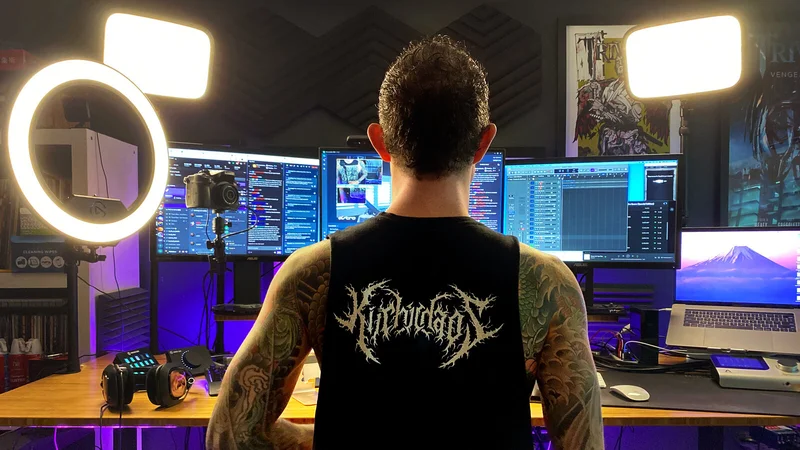
Clean, readable framing keeps eyes on you. Use key + fill + backlight (or a ring light + ambient lamp) with eye-level camera.
Compose with a simple background and one focal prop that says something about your niche.
Avoid harsh shadows and blown highlights. Good lighting makes thumbnails pop and reduces edit time on clips.
Pro tip: Tidy your background before you go live—remove clutter, then add one visible hobby or prop to spark conversation.
Build a 4-Scene Architecture
Pre-build Just Chatting, Gameplay, Story Cam, and Intermission scenes. Keep overlays minimal and mobile-safe. Assign hotkeys so swaps feel instant and cinematic.
Use Story Cam for moments that deserve your face (reactions, explanations), then snap back to Gameplay.
This rhythm creates natural hooks for clips and keeps the show visually alive.
Pro tip: Add a Stinger transition video and set its transition point when the screen is fully covered for seamless swaps (enable audio crossfade).
Open with a Hook in the First 30 Seconds

Start in motion: “Chat decides my first weapon—poll live.” No long “Starting soon” screens.
Tease the stakes and the payoff, then act. Hook → quick context → viewer action (vote, pick, predict).
Early engagement signals tell new arrivals they’ve landed somewhere lively, which increases follows and sticks raids.
Pro tip: Keep a “hook bank” document so your first line is never improvised under pressure.
Title Your Streams on Kick for Curiosity, Not Labels
Unlike Youtube, Rumble, or other platforms where you have thumbnails to grab peoples attention, on kick/twitch, your only weapon is a good title.
Curiosity clicks. Use promise + tension + outcome: “How long until my first death in Minecraft?” beats “Minecraft Ep. 1.”
Add a twist when possible (“Hardcore but chat sabotages me”). Keep titles short, skimmable, and congruent with the content to avoid drop-offs.
Also, 24h streams are good “clickbaity” titles, as people would often click to see how much time has the streamer already been streaming so far.
Pro tip: Update your title every stream; avoid empty labels like “come hang” or “let’s chill.”
Write Click-Worthy Go-Live Notifications
Treat go-live like a mini-headline: “Chat picks my loadout—first wipe ends stream.” Keep it true to the segment and avoid bait-and-switch.
Rotate 3–5 tested lines so regulars don’t go blind to them. Pair with a matching thumbnail/cover for congruent clicks.
Pro tip: Include a question or challenge in the notification to create instant curiosity.
Design a Simple, Mobile-Safe Thumbnail/Cover to Grow on Kick
Most viewers browse on phones. Use big subject, clean background, and 3–5 words max. High contrast, no tiny text.
Faces with expressive emotion work; otherwise a clear object tied to the hook. Test at 120 px—if it reads there, it reads anywhere.
Pro tip: Match the thumbnail promise to the first minute of stream to reduce early drop-off.
Stream on Kick Enough Hours to Be Discoverable
You can only grow while you’re online. If you streamed <5 hours in a month, fix that first. Early on, aim for 3–5 sessions/week and 12–20 total hours, with shows that are 90–120 minutes each.
The mix gives you enough hooks and raid opportunities without burning out. More quality reps = more chances to be seen and remembered.
Pro tip: Avoid marathon grinds early; long daily streams lead to burnout—use saved time to make clips.
Install a Moderation Bot + Clear Rules
Set up Nightbot/StreamElements: timers for FAQs, socials, schedule; link filters and banned words; simple rules in panels.
Empower human mods with a short handbook (timeouts, escalation, tone). A safe, welcoming chat increases messages/hour and encourages follows.
Pro tip: Add a few trusted moderators and enable automod/verification settings to blunt spam and bad actors.
Use Engagement Loops Every 15–20 Minutes
Schedule polls, predictions, “choose my build,” quick Qs on a timer. Aim for 60–120 chat msgs/hour in early growth.
Engagement resets attention, creates clip-worthy moments, and convinces new arrivals this stream is worth following.
Pro tip: Run a low-volume “sound bed” (royalty-free music) between speaking beats to prevent awkward silence on quiet moments.
Raid at the End of Every Stream
Always raid. Prep a 10-second intro pitch for the destination chat: who you are + your promise + next stream time.
Raids are free distribution—use them to seed future collabs and introduce your name to adjacent audiences.
Pro tip: Keep a shortlist of target channels and rotate to find the best retention fit.
Plan One Collab Every Two Weeks with Other Kick Streamers
Tap adjacent niches with co-op challenges or “coach me” formats. Swap short promos on Shorts/TikTok the day before.
Collabs raise your ceiling for a night, but repeating with the right fits raises your baseline. Keep a spreadsheet of prospects, dates, and outcomes.
Pro tip: Arrive with a one-page run-of-show so your collab feels tight, not chaotic.
Post Search-Value Long-Form YouTube Videos Weekly
Publish how-tos, beginner fixes, tier lists your niche searches. Chapter the video, link your next Kick stream in the pinned comment, and embed a short trailer.
Evergreen videos drive steady discovery that compounds into live viewers and follows.
Pro tip: End each video with a clear next-step CTA: “Live on Kick Tue/Thu 7pm.”
Build a Shorts/TikTok Pipeline
During streams, mark highlights. After, chapter the VOD; cut 3 clips with captions and strong openers; post within 24–48 hours.
End with a soft CTA (“Live on Kick Tue/Thu 7pm”). Short-form is your discovery engine—fuel it.
Pro tip: Upload natively and avoid outbound links/namedrops in the first seconds—some platforms downrank posts that push traffic away.
Create a Discord Hub
<img src=“/img/41-tips-on-how-to-grow-on-kick/image9.webp” alt=“Create a Discord Hub loading=“lazy"">
Use Discord to collect and activate fans: announcements, poll ideas, “clip of the week,” schedule reminders.
Welcome flow → introduce your one-line promise → pin stream times. Funnel Shorts viewers → Discord → live, so notifications aren’t your only lifeline.
Pro tip: Use a starter server template to speed setup and add channels for feedback, tech help, and future collab pitches.
Optimise Bio & Panels on Kick for Conversion
Put your one-line promise up top, followed by a schedule block, link hub, and rules. Feature your next stream time in bold.
Make panels scannable; one CTA per panel. Profiles that answer “who/when/why follow” convert.
Pro tip: Add accessibility: link to captions info and your PC specs/settings if your niche asks for them.
Script Segment Beats (Run-of-Show)
Plan beats: Hook → Challenge → Payoff → Reset. Write three prompts per segment.
Narrate decisions to kill dead air. Structure doesn’t kill spontaneity—it protects it by ensuring you always know the next move.
Pro tip: Keep three “silence savers” ready (mini-stories, quick rankings, rapid-fire Qs) for quiet chats.
Audit Categories & Time Slots
Test low-competition windows and niche categories. Track average CCV, CTR, and retention by slot/category for two weeks.
Stick where viewers find and keep you. Data beats vibes—let numbers choose your “home time.”
Pro tip: Avoid saturated categories when starting; pick games with healthier viewers-per-channel ratios.
Use Minimal Overlays with Safe Margins
Keep overlays simple and readable on mobile: event list, chat box, subtle alerts.
Respect safe areas; avoid clutter. If an overlay doesn’t aid comprehension or hype a moment, cut it.
Clean UI lifts retention and improves clip export.
Pro tip: Capture gameplay with “Game Capture” (not generic screen capture) for stability and performance.
Create a Hook Bank and Prompt Bank
Build a doc with 30 hooks and 30 chat prompts sorted by segment. Pull one every 15–20 minutes to reset attention.
Hooks turn scrollers into viewers; prompts turn viewers into chatters; chatters become followers.
Pro tip: Refresh the bank weekly from your VOD notes so it evolves with your content.
Set Tasteful CTAs to Grow on Kick
Tie follow requests to moments: “If this clutch made you smile, follow so you don’t miss the next disaster.”
Use a stinger or lower-third every 20–30 minutes. Explain perks (schedule, community nights, Discord). Avoid spam—earn the ask.
Pro tip: “Why follow?” blurb in panels to reinforce the ask passively.
Build a Monetisation Ladder Early!

Order matters: Follows → Discord → Subs/Gifts after value is proven. Pin perks in panels, thank by name without derailing pacing, and recap goals briefly.
Early, subtle monetisation trains support behaviors without scaring off new viewers.
Pro tip: Keep celebration alerts short and stackable so hype doesn’t stall the show.
Model Revenue Goals with a Subs Calculator
Set a 30-day target using subs × price × split. Check weekly vs actuals and adjust tactics (titles, slots, collabs).
A visible goal clarifies your asks and keeps you motivated.
Pro tip: Share progress bars sparingly—motivation without clutter.
Track the Metrics That Matter

Watch avg CCV, unique chatters, msgs/hour, title CTR, retention curve, clip→Short yield. Don’t chase vanity metrics.
If chat/activity rises, your follow rate will too. Track per stream and per week so trends are obvious.
Pro tip: Don’t doomscroll analytics—review on a set cadence (weekly/monthly), not after every stream.
Run a Weekly Retro + Two Experiments
After your final stream of the week, answer: What hooked? Where did viewers drop? What got clipped?
Pick two experiments for next week (title, hook, time slot, collab). Small, controlled changes create compounding gains.
Pro tip: Write retro notes while the show is fresh; it’s easier to fix what you can remember.
Stabilise Your Tech
Stream on wired ethernet, leave upload headroom, and keep a backup scene for crashes. Record locally for clean clips.
Test alerts and audio before you go live. Technical stability lets your personality—not problems—steal the show.
Pro tip: Diagnose lag like a pro: dropped frames = internet (lower bitrate); missed frames = GPU (lower game/shadows); skipped frames = encoder (cap 60/30 FPS).
Protect Your Energy
Batch prep (titles, prompts, overlays), schedule no-stream days, and set a pre-stream routine.
Fatigue kills charisma and retention. Sustainable cadence beats sprinting into burnout. Happy streamer, happy chat.
Pro tip: Normalize short BRB breaks and use a fun mini “be-right-back” browser game to keep viewers engaged. This simple offline background was found on Freepik.
Be Unmistakably You
Lean into quirks, bits, and catchphrases. Micro-branding (consistent phrasing, visuals, sound cues) makes you memorable and clip-able.
Generic hype blends in; specific personality stands out—and attracts the right followers.
Poggers in the lair!
Pro tip: Practice on camera 10 minutes/day, then review and list two likes/two fixes—your on-mic presence compounds fast.
Keep Learning Kick Updates
New categories, features, or programs = new angles. Follow creator newsletters and community posts.
Adjust segments, titles, and clips to ride trends quickly while they’re fresh. Early adopters reap outsized reach.)
Pro tip: Enable low-latency mode (where available) to tighten chat-response timing.
Be Genuine—Not a Persona You Can’t Sustain
Viewers feel it when you’re “performing.” Show up as you—it’s easier to keep consistent and it attracts the right people.
Let your real humor, pace, and preferences lead. Authenticity also simplifies decisions: if a trend doesn’t fit your voice, skip it.
Long-term growth comes from repeatable, honest energy, not a mask.
Pro tip: Join a healthy creator community (no follow-for-follow or spammy self-promo) to trade notes and avoid rookie mistakes.
Use Twitter/X to Embed in Your Niche
Don’t just drop “I’m live” links. Reply-usefully to niche conversations, share mini-tips, and celebrate peers. Pin your one-line promise + schedule.
When you do post go-live, attach a 7–10 second teaser clip instead of a static image—motion gets clicked and remembered.
Pro tip: Post your teaser clip first (7–10s, square, burned-in captions, hook in the first 2s). After 60–120s, reply to your own post with the stream link and pin that reply—this often preserves reach while keeping the link one tap away.
Stream “Content Over Nontent” on Kick

Plan segments, not just hours. Every 15–20 minutes, deliver a beat (challenge, poll, coaching moment, payoff).
Dead air is where viewers leave; content cadence is where they follow. If a segment stalls, pivot; if a bit pops, double down and thread it into future titles.
Pro tip: Overlay chat on top of your game (with a transparent always-on-top window) if you only have one monitor.
Multistream Strategically (Where Allowed)
If terms permit, simulcast to YouTube/TikTok to find new people and funnel them to Kick. Use unified overlays and a single CTA that points to your home base.
If you don’t simulcast, post after-stream clips fast (within 24–48 hours) with the next Kick time in the caption.)
Pro tip: Add live captions via an OBS captions plugin to include viewers who watch muted or are hard of hearing.
Stay Positive & Filter Out Noise
Twitter/X and chats can tilt negative. Use mod tools and mental filters: no doomscrolling before you go live, block/report bad actors, and keep your community guidelines visible.
Your tone sets the room—positivity attracts regulars, and regulars attract more regulars.)
Pro tip: If someone attempts to dox or share private info, ban quietly and handle it post-stream—don’t signal-boost it on-air.
Have Fun-And Show It
Joy is contagious; viewers mirror your energy. If a bit dies, pivot. If a bit pops, double down and thread it through future titles and thumbnails.
Laugh at scuffs, celebrate wins, and let the chat in on the ride—fun is the strongest retention mechanic you’ve got.
Pro tip: Press “Start Streaming.” Reps beat perfection—iterate live and improve every session.
FAQs
Does Kick pay $16 dollars an hour?
Yes—but only for eligible creators. Kick’s $16/hour applies to verified streamers in its Creator Program who meet the criteria (≈1,500 followers, 50+ streaming hours in 30 days, and active chat engagement).
Outside that program there’s no hourly wage—income comes from 95% sub revenue and 100% of tips (“kicks”).
Is it easier to grow on Kick or Twitch?
Twitch still commands the largest watch-time share, while Kick is smaller but growing quickly—so discovery depends more on off-platform content and consistency than on “algorithms.”
How do you get views on Kick?
Prioritize off-platform discovery (YouTube Shorts/TikTok), consistent schedules, and engagement tooling (alerts, overlays). Use Viewbotter for an extra boost to help you in your endeavours.
How do I promote my Kick channel?
Post short clips within 24–48 hours, pin your next live time, and cross-link bios. Repurpose VOD highlights and use Streamlabs’ Kick integrations to standardize branding and CTAs.
How much does Kick pay per 1000 views?
Kick doesn’t pay per 1,000 views (no CPM). Instead, eligible creators in the Creator Program earn $16/hour when requirements are met (1,500 followers, 50 streaming hours in 30 days, active chat participation).
Most income comes from monetization: 95% of subscription revenue goes to the creator and 100% of tips (“kicks”) pass through. So 1,000 views alone pays $0—earnings hinge on eligibility, subs, and tips.
Why are streamers switching to Kick?
Primarily for the 95/5 sub split and looser policies versus Twitch’s historic 50/50 baseline and ad pressure. Several outlets detail the migration dynamics and incentives.
Who pays more, Twitch or Kick?
Per $4.99 sub: Kick’s headline split is 95/5 (≈$4.74 to creators). Twitch’s standard is 50/50, with 70/30 available via the Plus/Partner Plus program for qualifying channels.
How long does it take to reach 50 followers on Kick?
Timelines vary. Many creators hit 50 by combining 2–3 weekly shows with regular Shorts and at least one collaboration every couple of weeks; Streamlabs emphasizes consistency and off-platform discovery.
What’s the best stream length for new Kick channels?
There’s no platform-mandated length. New channels often do 90–120 minutes focused shows, then scale as retention improves. Consistency and audience interaction are way over pure hours.
Does Kick have an algorithm? How do I get discovered?
Kick has limited discovery features, and results are mixed; creators report best growth by driving traffic from Shorts/YouTube and timing streams for lower competition.
What time should I stream on Kick?
Use analytics to pick low-competition windows in your category. Check viewer/channel ratios and trends, then test time slots and track retention/CTR.
StreamsCharts’ Kick overview and Twitch tools like SullyGnome inform timing decisions.