How to Join Twitch Teams in 2026
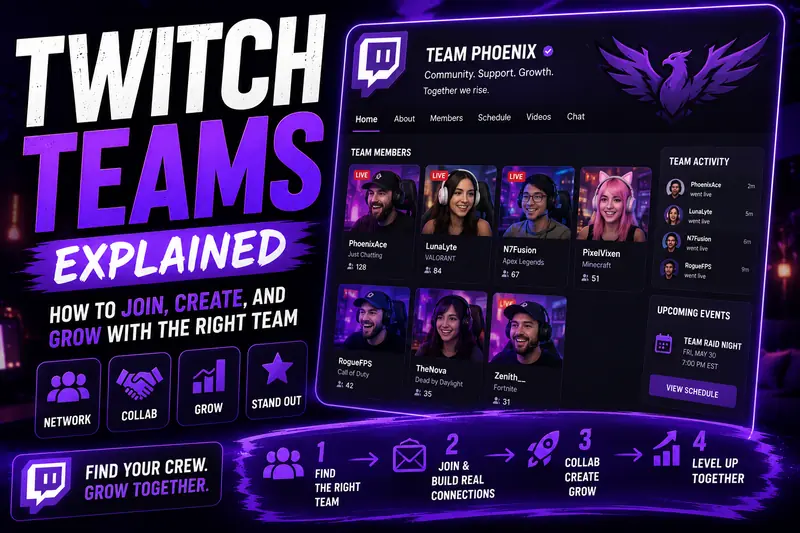
You have probably seen a team name sitting under somebody’s Twitch channel and wondered how they got in.
There is no secret application button hidden behind seven Creator Dashboard menus. Twitch Teams are invite-only. You find a team, build a relationship with its members, show that you are not going to disappear after two streams, and convince the owner that adding you makes sense.
That last part is where most streamers fumble it.
How Do You Join a Twitch Team?
To join a Twitch team, you must receive an invitation from the team owner or manager. Twitch does not provide a universal application page where you can browse every team and submit your channel.
The usual process looks like this:
- Find a team that matches your content.
- Get involved with its community.
- Contact a member or team owner.
- Apply through the team’s Discord or application form, if it has one.
- Receive an official Twitch invitation.
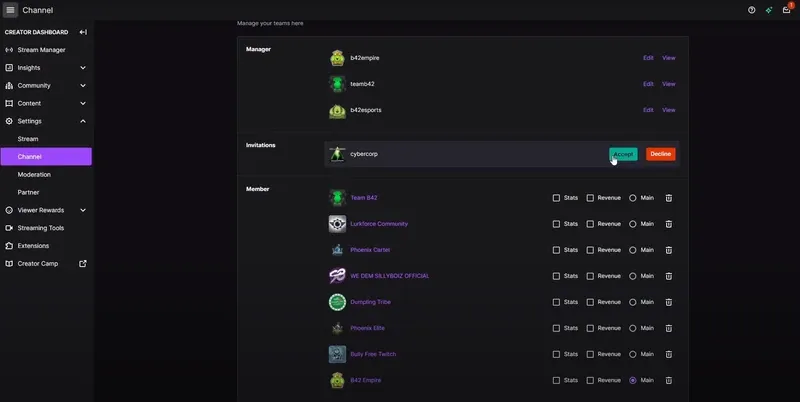
- Accept the invitation through your Creator Dashboard.
You do not need to be a Twitch Partner to join a team. The Partner restriction applies to creating a new Twitch Team, not joining an existing one. Twitch Partners can request up to two teams through Partner Help.
What Is a Twitch Team?
A Twitch Team is an official group of Twitch channels connected under one team page.
The team page can display its branding, description, members, featured channels, and streamers who are currently live. Members can also select one team as their main team so its name appears on their channel.
Teams are normally built around something shared, such as:
- A game or category
- A language or location
- A content style
- A creator organisation
- An esports brand
- A charity or social cause
- An existing Discord community
Some are serious creator networks with planned collaborations, shared events, sponsor opportunities, and active management.
Others are basically a logo and a Discord server where 600 people post their live link into a channel nobody reads.
Check which one you are joining.
Twitch Teams Are Not the Same as Stream Together
This gets mixed up constantly.
A Twitch Team is an ongoing group of creators with a shared Twitch page.
Stream Together is Twitch’s live collaboration feature. It lets streamers broadcast together, combine parts of the viewing experience, and use tools such as Shared Chat. Twitch has also added Drop Ins, which let live creators request to join another streamer’s broadcast.
You can collaborate with people who are not on your Twitch Team. You can also join a team and never collaborate with anyone on it, although that would make the whole thing fairly pointless.
How to Find Twitch Teams to Join
Twitch does not offer a clean public directory where you can filter teams by game, language, size, or whether they are accepting members.
That means finding the right team takes a bit of digging.
Check the Teams of Streamers You Already Watch
Start with streamers around your size who make similar content.
Open their channel and look for a team name. Visit the team page and check:
- How many members are active
- Whether members stream similar content
- Whether the same three people get all the attention
- Whether the team has a Discord or social account
- Whether members raid and collaborate
- Whether the page has been updated this decade
Do not only look at huge streamers.
The team containing a creator with 20,000 viewers is not automatically better for you. In a massive organisation, your 12-viewer Valorant stream may sit so far down the roster that you become decorative furniture.
A smaller active team can be far more useful.
Search Twitch, Discord and Social Media
Many teams recruit through Discord, X, Reddit, Bluesky or their own websites.
Search phrases such as:
- Twitch teams recruiting
- Twitch team applications
- Small streamer team
- Valorant Twitch team
- VTuber Twitch team
- UK Twitch stream team
- LGBTQ Twitch team
- Horror streamer team
Add your niche, language or region to avoid drowning in random recruitment posts.
You may also find teams by checking who regularly collaborates with creators in your category. Streamers who raid each other, run community nights and appear in the same Discords are often already connected through a team or informal creator group.
Treat It Like a Vibe Check
One of the better pieces of forum advice is to watch potential teammates before approaching them.
See how they behave live. Check how their moderators act. Look at what happens when somebody has a bad stream, makes a mistake or disagrees with the group.
A Twitch Team can put its name on your channel. You should know what that name represents.
Community discussions about stream teams repeatedly come back to the same point: similar content helps, but matching personalities and attitudes matters just as much.
What Do Twitch Teams Look for in New Members?
Every team has different requirements, but good teams rarely invite somebody just because they asked nicely.
They want a streamer who adds something.
A Consistent Channel
You do not need to stream seven days a week until your chair becomes part of your spine.
You do need to look active.
A team owner checking your channel should be able to see recent broadcasts, clips, a usable schedule and some evidence that you take streaming seriously.
Going live twice in January, disappearing until April, and returning with “THE COMEBACK IS REAL” does not scream reliable teammate.
Content That Fits the Roster
Teams often recruit creators whose content overlaps with their existing audience.
A horror-focused group may want horror games, paranormal content and spooky Just Chatting streams. A competitive FPS team may look for ranked gameplay, tournaments and coaching content.
You do not have to clone the existing members. In fact, bringing something different can help. It still needs to make sense beside the rest of the roster.
A Real Community Presence
Team owners notice streamers who support others without turning every interaction into self-promotion.
That means:
- Joining community events
- Talking in Discord
- Raiding teammates
- Appearing in collaborations
- Watching streams because you like them
- Helping other creators
- Not dumping your link and vanishing
Nobody likes the streamer who appears only to type “LIVE NOW” before teleporting back into the void.
Something Useful to Contribute
Ask yourself what the team gains by adding you.
Maybe you are good at organising events. Maybe you edit clips, design graphics, understand OBS, run tournaments or create genuinely funny group content.
Your value could also be a strong niche, an active chat or access to a community the team does not currently reach.
“Please help me grow” is not a contribution.
How to Ask to Join a Twitch Team
Do not enter a streamer’s chat and ask for a team invitation while they are fighting a final boss.
Find the team’s official contact route first. Check its Twitch page, website, Discord and social profiles for an application form or recruitment channel.
When there is no public process, ask a member who manages recruitment.
Keep the message short:
Hey, I have been following the team for a while and really like the community around it. I stream [content] on [schedule] and average around [viewership]. Are you currently accepting applications? I would be happy to send my channel and more information.
Do not write a twelve-paragraph autobiography.
Do not promise that your “grindset” will revolutionise the team.
Do not follow up six times in one afternoon.
If the answer is no, take it normally. You may simply be too small, too large, outside the niche or a bad fit for the current roster.
How to Accept a Twitch Team Invitation
Once the owner sends the invitation:
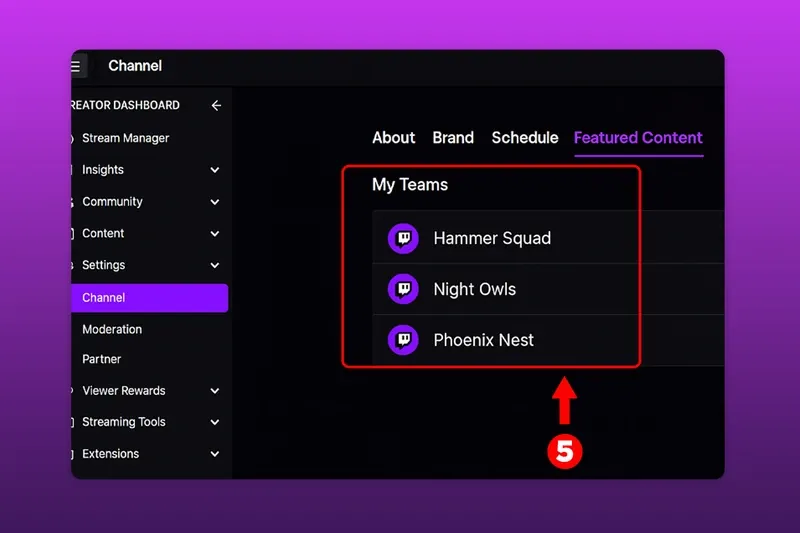
- Open your Twitch Creator Dashboard.
- Go to Settings.
- Select Channel.
- Open Featured Content.
- Scroll down to My Teams.
- Find the invitation.
- Select Accept.
Twitch notes that team invitations can expire. The My Teams section may not appear when you have no current teams or active invitations.
After joining, you may be able to:
- Select the team as your main team
- Share channel statistics with the owner
- Share revenue data with the owner
- View the team page
- Remove yourself from the team
Read every option before enabling it. Joining a community does not mean every administrator automatically needs access to your financial data.
Can You Join More Than One Twitch Team?
Twitch streamers can join multiple teams, although only one can be selected as the main team displayed on the channel.
That does not mean joining 14 teams is a smart move.
Some teams require exclusivity. Others expect members to attend events, raid teammates, use team branding or stay active in Discord.
One useful team beats ten abandoned ones.
Before joining multiple groups, check whether their rules conflict. The last thing you need is Discord politics because Team A thinks your charity event with Team B violated subsection 14 of its sacred streamer handbook.
Are Twitch Teams Worth Joining?
A good Twitch Team can absolutely be worth joining.
The useful part is not the small team name under your channel. It is access to people.
Pokimane once explained why she started streaming:
“I figured that streaming on Twitch would be a way for me to make more friends to play games with.”
That social side still matters. Twitch is difficult to grow on as a solo island.
A useful team can give you:
- Reliable collaborators
- Constructive channel feedback
- Raids from relevant creators
- Group streams and community events
- Clip and video opportunities
- Technical help
- Moderator recommendations
- Introductions to brands or organisers
- People who understand why you are annoyed about a two-second audio delay
Twitch CEO Dan Clancy has said he consistently hears that “collaboration has been critical to their success on Twitch.”
The key word is collaboration.
Merely appearing on a roster does almost nothing. You still need to show up, make content with people and give the team reasons to support you.
Red Flags to Watch Before Joining
Some Twitch Teams are less “creator community” and more “mandatory support circle with a logo.”
Watch for these warning signs:
Random Invitations
Be careful when an unknown team invites you without ever watching your stream or speaking to you.
It does not automatically mean the team is a scam. It may mean the owner is collecting as many channels as possible to inflate the roster.
Forum discussions include plenty of streamers questioning invitations from teams they have never heard of, especially when the benefits and leadership are unclear.
Paying Just to Join
A team charging for coaching, editing or another real service is one thing.
A team demanding a monthly membership fee purely to place its name on your channel should have an extremely good explanation.
Do not pay for “exposure” that consists of joining a muted Discord and reacting to the owner’s stream announcement.
Forced Lurking or Raiding
Mutual support can be useful. Mandatory attendance turns it into a chore.
Be suspicious when a team measures loyalty by how many hours you sit silently in the owner’s stream or how often you raid the same top members.
A healthy team creates collaboration. It does not funnel every member’s audience toward one person.
Big Growth Promises
No team can guarantee that its badge will make your channel take off.
Ask for specific examples:
- What events did the team run recently?
- How often do members collaborate?
- How are smaller channels included?
- Who manages disputes?
- Are there sponsor relationships?
- What is expected each month?
- Why did previous members leave?
Watch what the team does, not what its recruitment graphic promises.
How to Make a Twitch Team Help Your Channel Grow
Joining is the easy part. Getting value from it takes effort.
Plan Actual Collaborations
Do not stop at “we should stream together sometime.”
Pick a game, date and format.
Try:
- Duo challenges
- Community tournaments
- Tier-list debates
- Coaching streams
- Speedrun races
- Horror game relay nights
- Shared Chat sessions
- Team podcasts
- Clip competitions
- Charity streams
Twitch now offers Stream Together, Shared Chat and Drop Ins to make creator collaboration easier. Use the tools instead of letting every idea die in the group chat.
Raid With a Reason
Raid teammates whose content makes sense for your viewers.
Tell your chat who they are and why you enjoy watching them. Stay for a few minutes and help the conversation move.
A silent raid followed by everyone instantly leaving is technically a raid. It is also socially useless.
Turn Collaborations Into Clips
One group stream should produce more than one evening of content.
Pull the best moments into:
- TikTok videos
- YouTube Shorts
- Twitch clips
- X posts
- Discord highlights
- Longer YouTube edits
This gives every participating streamer something to share and creates several chances for new viewers to find the group.
Where ViewBotter Fits In
A Twitch Team can help with networking, collaboration and audience sharing. It cannot force people to click a channel that looks buried at the bottom of a category.
That is the other part of the problem.
ViewBotter’s Twitch Viewer Bot helps create visible activity when your stream goes live. You can control how quickly viewers arrive, use auto-live settings and keep viewers active through short connection drops. ViewBotter positions its viewer journey as completely undetectable and supports natural directory navigation through its own proxy network.
The Twitch Chat Bot can add chat activity so a new visitor does not arrive to a viewer count and a completely dead room.
You can also try ViewBotter free for 30 minutes with 25 viewers and 25 chatters before choosing a plan.
A team gives you people to create with. ViewBotter helps give that content a stronger starting position.
How to Create Your Own Twitch Team
Only Twitch Partners can request the creation of an official Twitch Team.
The Partner must open a support ticket through Partner Help and provide:
- The requested team page URL
- The team display name
- The Twitch account that will own or edit the team
Partners are limited to creating two teams. Deleting a team or transferring its ownership does not restore the creation slot.
After Twitch creates the team, its owner can invite members, update branding, manage the member order and select featured channels.
Not a Partner yet?
You can still build an unofficial stream group through Discord, shared branding and regular collaborations. The official Twitch team page is useful, but it is not what makes a creator group work.
Frequently Asked Questions
Do You Need to Be a Twitch Affiliate to Join a Team?
No. A team owner can invite regular Twitch accounts, Affiliates or Partners. Individual teams may set their own minimum requirements.
Can I Apply to a Twitch Team Through Twitch?
No universal application system exists. You need to contact the team or follow its own application process before receiving an official Twitch invitation.
How Do I Get Invited to a Twitch Team?
Create consistent content, become active around the team’s community, build relationships with members and ask whether applications are open. Teams are more likely to invite people who already feel like part of the group.
Can Twitch Teams See My Revenue?
You may be given an option to share revenue information with the team owner after joining. Review your team settings and do not enable data sharing unless you understand why it is needed.
Do Twitch Teams Pay Their Members?
Most community Twitch Teams do not automatically pay members. Esports organisations, agencies and sponsored creator groups may offer contracts, but those arrangements exist separately from the basic Twitch Teams feature.
How Many Twitch Teams Can I Join?
You can join multiple teams, but only one can be set as your main team. Some organisations may require exclusivity.
Can I Leave a Twitch Team?
Yes. Open the My Teams section in your channel settings and select the option to remove yourself. It is still worth telling the owner first rather than disappearing and creating unnecessary Discord lore.