How to Stream Privately on Twitch - Explained Step by Step
Can you make a Twitch private stream? Not officially. Twitch doesn’t have a true “private mode,” and there’s no password protected stream option.
But there are four practical workarounds depending on your goal:
-
Hidden stream (hard to discover)
-
Subscriber stream (paywalled)
-
Bandwidth test mode (for setup checks)
-
Moving the streaming session to Discord or YouTube Unlisted
Below, you’ll see what each method does, who it’s for, and how to set it up.
Can You Actually Do a Private Stream on Twitch? (Quick Answer)
There’s no true private Twitch stream, but you can stream privately in practice using hidden/no-metadata streams, subscriber-only mode, bandwidth/test streams, or by shifting to Discord/YouTube Unlisted for friends-only viewing.
These approaches are widely referenced by creator guides and community threads; each one solves a different problem (testing vs. friends-only).
Reasons Why You Would Like to Stream Privately?
Two common reasons: testing your setup without an audience, or keeping a session limited to friends.
| Aspect | Test Your Internet Connection, Audio and Video Settings, and Encoders | Stream Gameplay to Friends Only |
|---|---|---|
| Goal | Verify bitrate, FPS, encoder stability, and video quality before going public. | Host casual or intimate sessions with your friends only. |
| What You Need | A private environment for diagnostics without appearing in the Twitch directory. | Restricted audience and shareable link for trusted viewers. |
| Best Option on Twitch | Bandwidth test mode + Twitch Inspector; optionally use a hidden test Twitch account. | Hidden/no metadata stream or subscriber stream on your main Twitch channel. |
| When to Use Discord/YouTube | When you want full privacy for rehearsal or setup tuning. | When you want stricter access, use Discord roles or a YouTube Unlisted link. |
Private Stream for Test: Connection and Setup
When you’re troubleshooting video quality, encoder choices, or audio and video settings, you don’t want the whole Twitch channel watching.
Use Twitch’s bandwidth test behavior and Twitch Inspector to validate bitrates, dropped frames, and encoder stability without promoting a new stream to the world.
This is the safest way to verify your streaming software changes and internet connection upgrades before a real show.
Stream Privately for Friends Only
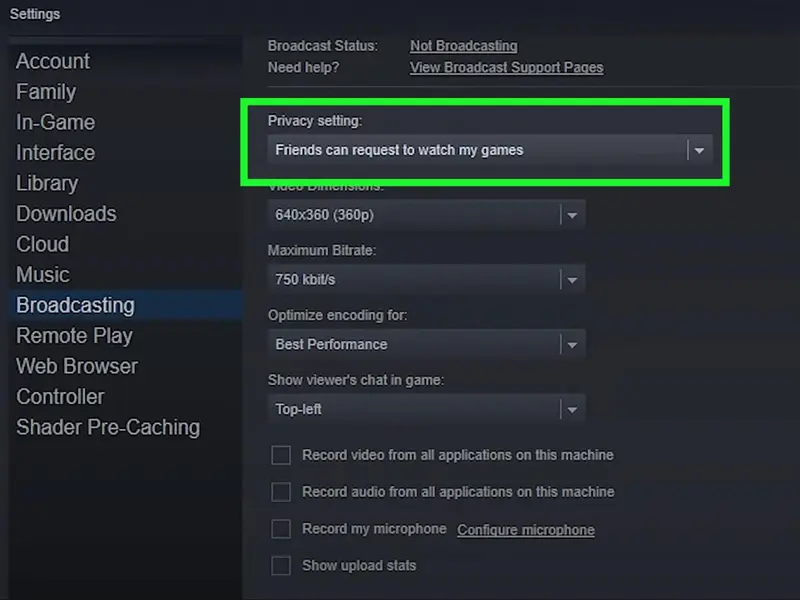
No official “friends-only” toggle exists. The common workaround is to run a “hidden” stream: don’t pick a category, strip tags, avoid SEO’d titles, and share the direct URL only with friends.
For a soft paywall, switch to subscriber stream (requires eligibility on your Twitch account).
If you want strict access control (roles, invites), many streamers recommend moving the streaming process to Discord or sending a YouTube Unlisted link.
How to Set Up a Private Twitch Stream
You’ve got two main paths on Twitch itself: testing privately (diagnostics) or friends-only streaming (hidden/subscriber).
How to Set Up a Private Stream for Testing
Use Twitch’s diagnostics and a non-discoverable flow:
-
Open Twitch Inspector.
-
From OBS/your streaming software, enable the platform’s bandwidth test behavior (so the broadcast isn’t promoted).
-
Start the test stream and watch Inspector for: bitrate stability, dropped frames, resolution/FPS, encoder, and A/V codec info.
-
Adjust audio and video settings (bitrate, keyframe interval, encoder profile) and re-test until Inspector shows healthy green indicators.
-
Optional: create a separate test Twitch account so notifications, followers, and your main Twitch channel don’t get pinged.
-
When stable, end the test and go live normally from your main profile.
How to Set Up a Private Stream for Friends
Limit discovery; share directly with the people you want:
-
Creator Dashboard → Stream Manager → Edit Stream Info
-
Keep it unlisted-by-behavior:
-
No category, no tags, no SEO phrases.
-
Neutral title (avoid trending keywords).
-
-
Go live and share the direct channel URL only with friends (DM/Discord).
-
For a soft paywall, enable subscriber stream (if eligible on your Twitch account).
Streaming Privately on Discord or YouTube Unlisted (Other! Options)
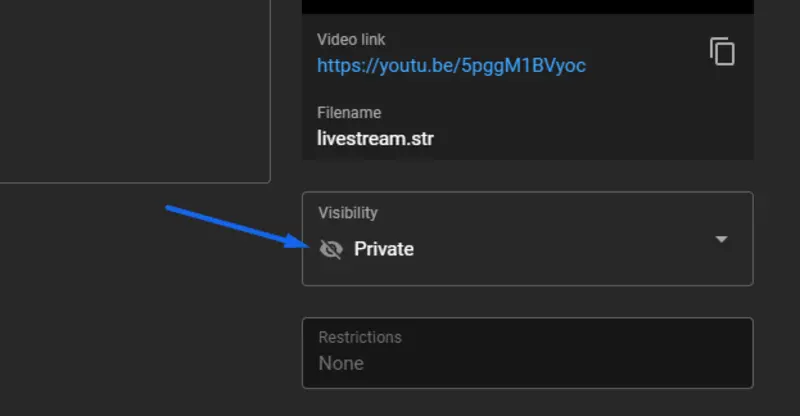
If you truly need privacy, Discord and YouTube handle it better than Twitch.
-
On Discord, create a server, assign roles, and Go Live in a private voice channel; only members with access can see the stream.
-
On YouTube, set your visibility to Unlisted and share the link with friends; the video is accessible only to people with the URL.
Both options are popular in community guides because they let you stream privately with far tighter control than Twitch’s discovery-driven environment.
If you’re testing overlays or want a controlled streaming rehearsal for stream gameplay, both platforms are simple and predictable.
Viewbotter — Your Twitch Buddy
Private sessions handle testing and closed hangouts. But when you’re ready to go public again, momentum matters. That’s where Viewbotter helps:
-
Give your stream early social proof with stable viewers via ViewerBot so your category position isn’t doomed by “0 watching.”
-
Keep the room lively while you warm up using ChatBot so streams don’t feel dead at the start.
-
Lock in visible traction with FollowBot to strengthen your channel’s first impression.
Use private tests to perfect your tech, then use Viewbotter’s tools to stop getting buried by the algorithm once you go public again.
FAQ
What is private streaming?
“Private streaming” on Twitch means using workarounds to limit who sees your broadcast: hidden/no-metadata streams, subscriber-only broadcasts, bandwidth test mode (for diagnostics), or shifting to Discord/YouTube Unlisted for stricter access.
There’s no one-click private Twitch stream button on the platform.
Can you hide your stream from followers?
Not completely. You can reduce discovery (no category, tags, or SEO title) and share the link only with friends, or use subscriber-only mode if your Twitch account qualifies.
For true privacy, Discord roles or a YouTube Unlisted link are recommended in creator guides.
How to stream privately on Twitch Xbox?
The “private” part isn’t device-specific. Whether you’re on Xbox or PC, you’ll use the same behaviors: hidden/no-metadata streams for friends, subscriber-only if eligible, or test mode with Inspector for diagnostics.
For strict access, many streamers route the session through Discord or YouTube Unlisted.
Can you password protect a Twitch stream?
No. Twitch doesn’t support a password protected stream.
If you need actual gatekeeping, Discord (role-based access) or YouTube Unlisted (URL-gated) are the common alternatives referenced by streamer guides.
Can Twitch ban you for private streaming?
Using test/hidden flows or subscriber-only mode is standard practice across community how-tos. Follow Twitch’s rules and content guidelines the same as public streams.
“Private” methods don’t exempt you from TOS, they simply limit who can find the broadcast.
Can banned users still watch?
Bans restrict chat and participation. They can still attempt to view a public broadcast via the channel page.
If you must keep specific people out of a session, use Discord roles or YouTube Unlisted and only share links with trusted friends.
Is there a way to test a stream without going live?
Yes. Use bandwidth test behavior with Twitch Inspector to validate bitrate, dropped frames, encoder, and video quality without promoting a new stream to the world.
Many creators also keep a separate test Twitch channel for experiments, or they run rehearsals on Discord.